ASAMCommander is a web-based test data management and free ASAM ODS client. It enables engineers and analysts to find, explore, and reuse measurement data efficiently across projects, test benches, and sites. ASAMCommander is built around modules that add dedicated capabilities, such as navigation, search, or bookmarking, within a shared user interface and common services. ASAMCommander works with any ASAM ODS–based system, including the AVL Santorin and Eclipse openMDM application models.
The Lite Version provides a basic feature set for everyday work with measured data. It combines intuitive navigation for large data volumes with flexible search and filtering, as well as integrated visualization for fast inspection and comparison.
ASAMCommander Lite is available as a free ASAM ODS client.

ASAMCommander Lite brings test data, metadata, and results into one place for fast exploration. You can move from campaigns and measurements down to the signals and segments you need with minimal clicks. Interactive plots and saved selections help you keep context and return to relevant datasets later.

Inspect measurement content directly in the browser to check plausibility and completeness. Quick previews and key details help you confirm that you selected the correct dataset before continuing. This reduces rework and improves confidence in downstream analysis.

Use HQL to turn questions into precise dataset selections. The Lite version features an HQL-based query experience that enables you to identify the right measurements quickly and repeatably. It also serves as a natural starting point for automation and advanced analysis workflows with the MATLAB and Python toolboxes.

The Explorer supports flexible exploration of test data in any ASAM ODS–based system. It offers configurable browsing and filtering views that can be aligned with how engineers structure measurements and test campaigns. At the measurement level, Navigator provides fast access to key details and quick signal previews through simple plots.

Search provides a consistent way to locate datasets across your test data management system. It combines a quick, global “Google-like” search with guided, structured filtering for more precise queries. For power users, the query builder supports creating, saving, and reusing HQL queries to identify datasets and define repeatable search logic.

Bookmarks helps users collect and revisit relevant datasets, turning one-time discovery into reusable working sets. Items can be added from other modules and organized into multiple lists for personal or team workflows. Bookmarks support combined actions such as bulk export or processing via Merlin analysis jobs.

Explorer module of ASAMCommander
Navigator supports flexible exploration of test data in any ASAM ODS–based system. It offers configurable browsing and filtering views that can be aligned with how engineers structure measurements and test campaigns. Selected datasets can be forwarded to integrated expert tools, submitted to processing pipelines, or exported in multiple formats.

The data navigation allows a quick search for users that know the name or code of their measured data. This allows a quick jump right to the data the user is looking for.

The ASAMCommander Navigator has a built-in data editor for editing single data sets and correcting data (security restrictions apply) for Enterprise Edition users.

Measured data may include attached documents, such as images or reports, that can be added to a data set. With the document manager, these files can be viewed, downloaded, deleted, or described as information to be edited.
The Search Module of ASAMCommander is a universal tool for finding data sets in the Test Data Management system. It is based on the HighQSoft Query Language (HQL) and offers very flexible search features. All provided search features work on any model. Additional requirements can easily be added for every type of user, providing a way to find data quickly and according to individual preferences.

Advanced Search in ASAMCommander (available in free ASAM ODS client)
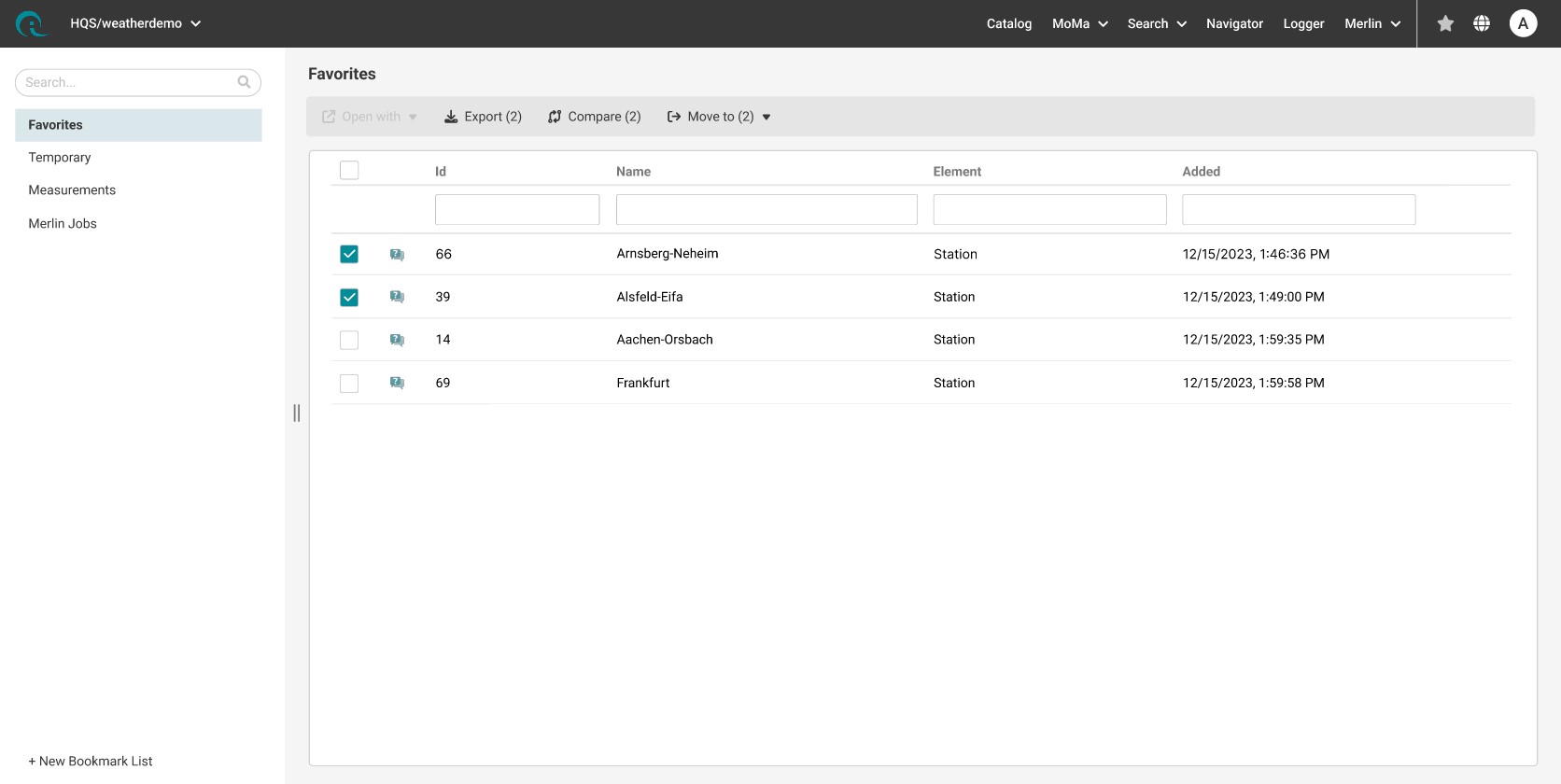
Bookmarks module of ASAMCommander
Finding single datasets is one thing, remembering the important ones is another.
Bookmarks helps to gather data or keep it in sight for the future. Bookmarks can be defined from all other relevant modules and be managed in multiple lists. Once collected, the features of data exports and processing with Merlin/SAM analysis jobs can be executed as combined actions.

You can save and manage your personal bookmarks temporarily or persistently. Bookmark lists can be created and deleted, and corresponding filters and search options quickly find items.

Individually executed analysis or reporting jobs will be stored in a separate list in Bookmarks. Any results, be it in calculated values, images, or documents, can be verified individually.

Bookmarks can be flexibly arranged and grouped for a joint toolbar action. This way, analysis and exports jobs can be executed in bulk.
HighQSoft GmbH
Black-und-Decker-Straße 17b
D-65510 Idstein


