The System Administration module provides operational transparency directly in the ASAMCommander user interface. It supports monitoring through system statistics and health indicators, and it helps administrators troubleshoot issues with consolidated logging across ASAMCommander tools and services. It also provides monitoring and control for import and analysis jobs, so job status, results, and logs are accessible in one place.

System Logging brings relevant log information into one consolidated view, which is especially helpful in restricted IT environments where log files are distributed and not easily accessible. Administrators can filter events, correlate messages across components, and build a consistent picture of what happened during a service run or user session.

Monitoring and control provides a system wide view of import and analysis jobs and their lifecycle. Administrators can filter by status and time, inspect results and logs, and take actions such as restart, pause, dismiss, and bookmarking to keep processing reliable and transparent.

System health indicators provide a compact view of how the system is performing. Queue state, completion outcomes, and utilization metrics help administrators detect bottlenecks, verify stability, and respond quickly when behavior changes.
In enterprise environments, troubleshooting often fails on logistics rather than expertise. Logs are spread across services, access is limited, and manual correlation takes time. ASAMCommander addresses this by presenting the relevant logging information in one place, structured for fast investigation.
With the Logger module, system components can be integrated with any system service. Logging from HighQSoft components is collected centrally and shown in a consolidated viewer, and the setup can be extended to include additional systems and services when required.
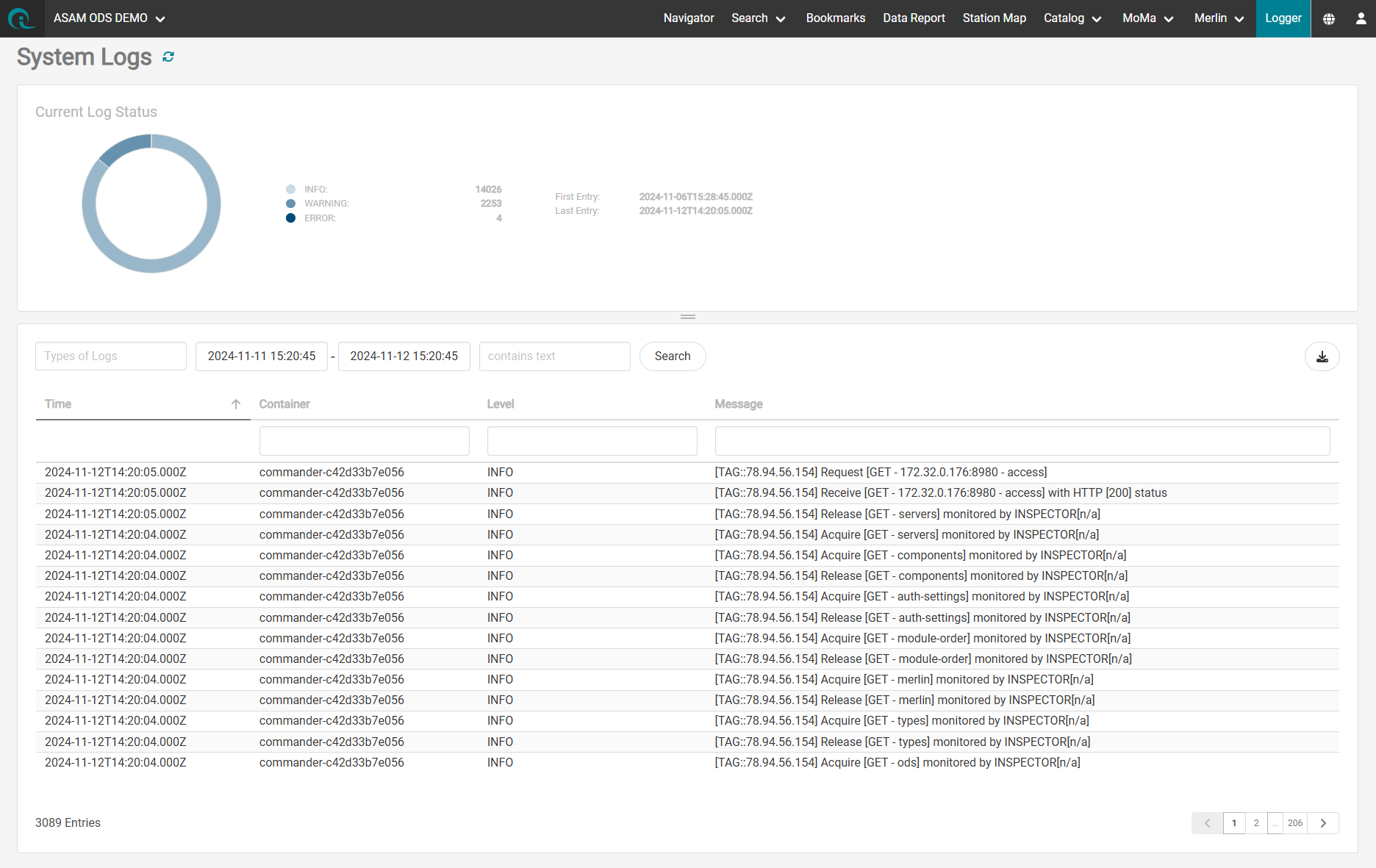
Logging feature of ASAMCommander

The log viewer allows simplified investigations for errors, warnings, and information events. It provides all information to browse, filter, and extract the information needed for a registered service or session. This feature targets IT administrators to resolve system issues or investigate IT tickets.

Trace analysis is a necessity when investigating user sessions in an enterprise system. Instead of investigating multiple log files and combining all information for investigations, it would be easier to have everything at hand. The Logging module tracks the information from all our software including AReS ODS Server, Ares Libertas, HQL, and our Gateways.

System health indicators provide a compact view of how the system is performing. Queue state, completion outcomes, and utilization metrics help administrators detect bottlenecks, verify stability, and respond quickly when behavior changes.
The Merlin Jobs Monitoring view provides a system wide overview of all processing jobs, including status, identifiers, and timestamps. Administrators can filter the list, review results and logs, and manage job lifecycles directly in the UI.
Engineers can access their own jobs through bookmarks, which makes it easy to return to outcomes and logs without searching through the full system list. This keeps operations transparent while supporting efficient self service review for day to day work.
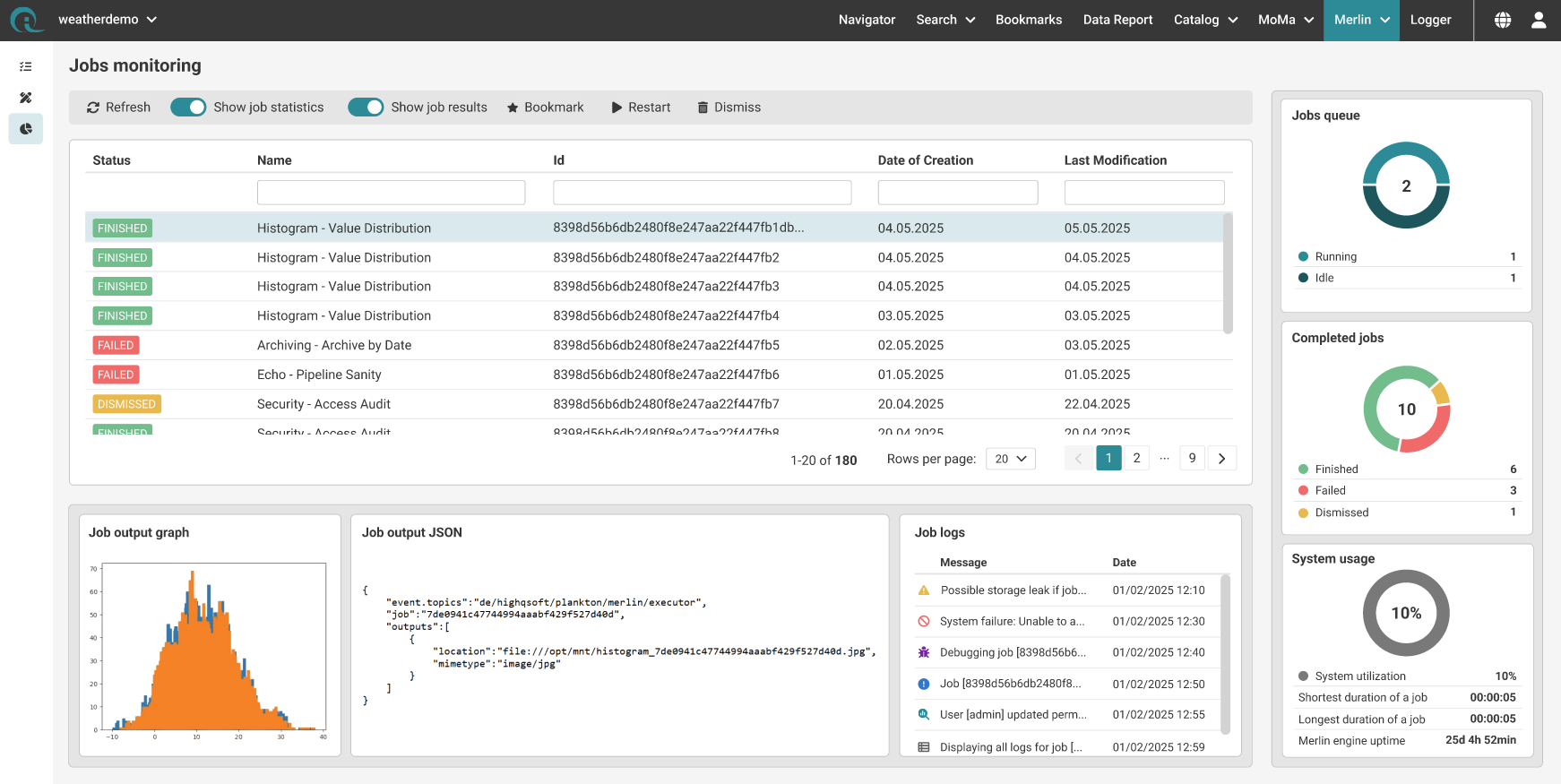
Job Monitoring for Administrators (also available for Engineers via Bookmarks)
Jobs queue gives administrators an immediate view of whether work is flowing through the system. It highlights how many jobs are currently running versus waiting and helps spot backlogs early. When queue size or waiting time grows, it is a clear signal to check capacity, priorities, or upstream import activity.

Completed jobs summarizes outcomes over a recent period so stability is visible at a glance. It separates finished, failed, and dismissed jobs, making it easy to detect trends and react quickly when failures increase. For efficient operations, this widget is most useful when paired with quick access to the failed jobs list and their logs.

System usage provides context for performance and bottlenecks by showing overall utilization and key runtime indicators. It helps administrators judge whether slow processing is caused by limited resources or by job specific issues. Combined with queue and completion status, it supports faster decisions on whether to scale resources, adjust scheduling, or intervene in individual jobs.
HighQSoft GmbH
Black-und-Decker-Straße 17b
D-65510 Idstein


