ASAMCommander is HighQSoft’s web-based, modular, standards-driven client for ASAM ODS test data. Test engineers browse, search, and visualize measurement data in the browser; administrators manage catalogs, monitor the system, and onboard data without installing anything on the desktop. Release 26.1.1 closes the first feature development cycle and delivers the largest module overhaul since the 25.2 platform update, the completely redesigned Merlin UI.
The headline of this release is the new Merlin UI, the ASAMCommander module for workflow automation with the Merlin Analysis Server. The previous Merlin module had grown apart from the rest of the product; it looked and behaved differently from Navigator, Catalog Editor, and the other modules. We redesigned it from scratch, starting with user interviews and interface prototypes, and integrated the result into this release. Merlin UI now shares the same interaction patterns as every other ASAMCommander module, so creating evaluations, launching jobs, and monitoring them feels like one product, not two.
The redesigned module covers the full evaluation workflow. Engineers browse available evaluations, provide parameters, and launch jobs; a system-wide monitoring view tracks running and queued jobs in real time; and the Blueprints Manager organizes reusable evaluation templates, including activating and deactivating blueprints so teams control exactly which evaluations are available for production use.
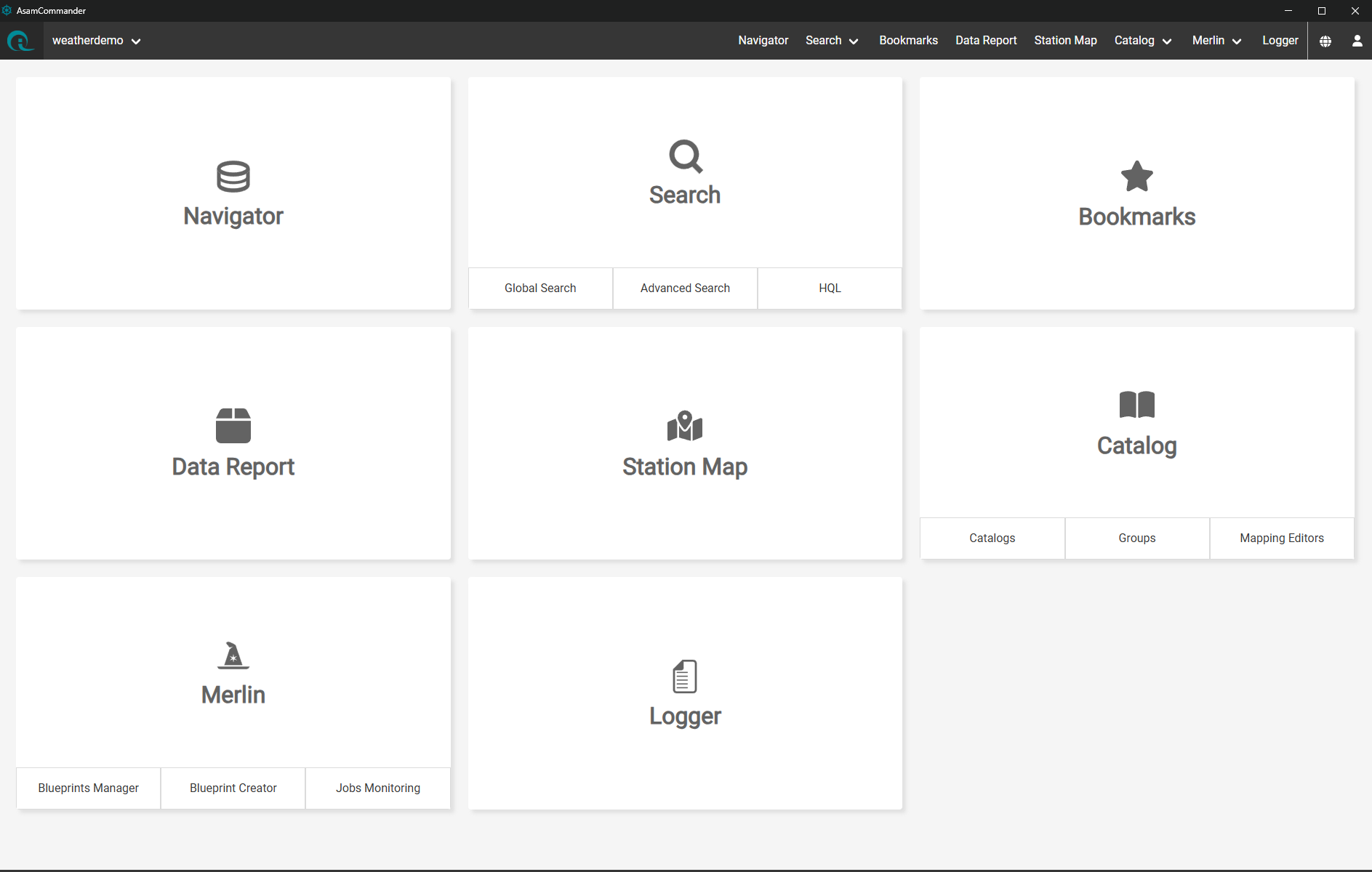
ASAMCommander ODS Client with Workflow Automation
Beyond the Merlin UI redesign, 26.1.1 improves nearly every module of the product.
ASAMCommander 26.1.1 also introduces the AC Professional Distribution, a verified bundle in which the mainframe and all module versions are tested to work together. It ships as a single Docker image and as a ZIP/TAR archive, available from the HighQSoft public Harbor registry and our download platform. Contact your HighQSoft representative to plan the update, or reach us through highqsoft.com.
*#ASAM #ODS #ASAMCommander #Merlin #TestData #TestDataManagement #HighQSoft*
Following the release of Anthropic's newest Claude model, Fable 5, HighQSoft ran a focused experiment. Could an AI agent derive a reusable skill that creates ASAM ODS dashboards on measured data?
The specification was about 20 lines long and contained mostly boundary conditions, namely Streamlit as the dashboard framework, pyHQL for data access, and the HighQSoft MCP Server for ASAM ODS as the discovery layer. The dashboards themselves were a free pass.
The directions were to discover the database, create five dashboards, keep the skill generic by representation type (graph, geo, table), offer features such as sliders and filters based on the discovered application model, and reinforce lessons learned from each step.
The agent ran for 25 minutes with one manual feedback loop. The result on HighQSoft's weather demonstration database was five working dashboards, a Channel Explorer, a Climate Map, Database Statistics, Last Data Imports, and a Measurement Channel Comparison. Every dashboard runs on live HQL queries against the ODS server. No data was exported, copied, or staged.
Two components made the result possible.
The five dashboards are the visible output, but the actual result is the skill that now builds the next ones. Because the skill works from model discovery rather than hard-coded names, it transfers to any ASAM ODS application model. Test engineers describe the view they want in plain language, and the skill composes, validates, and ships a live dashboard from there.
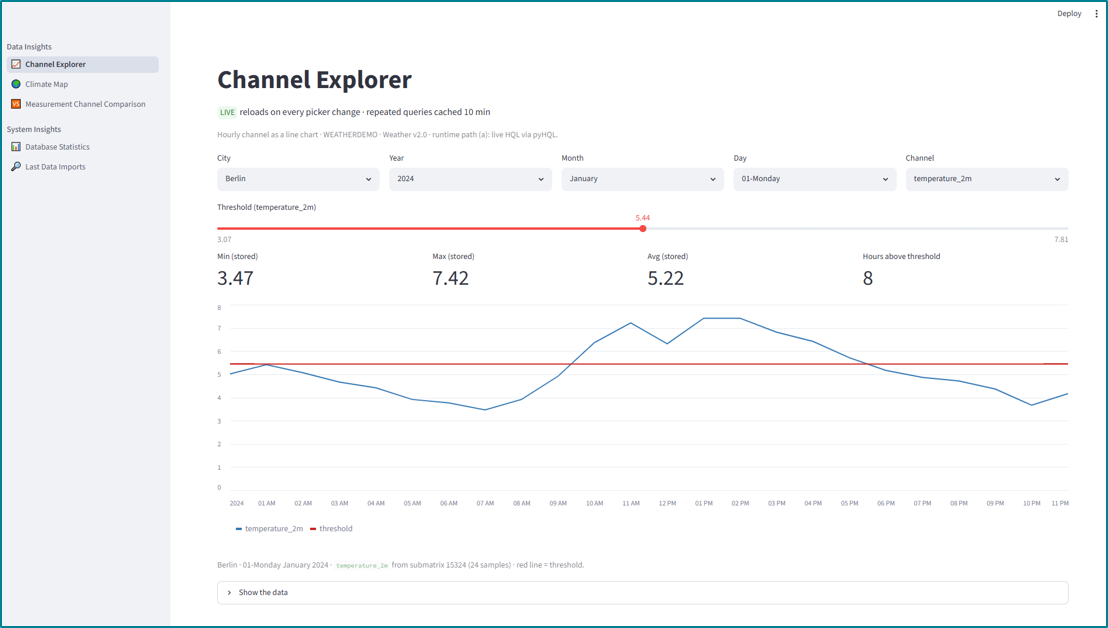
ASAM ODS Dashboards - Channel Explorer (Streamlit)
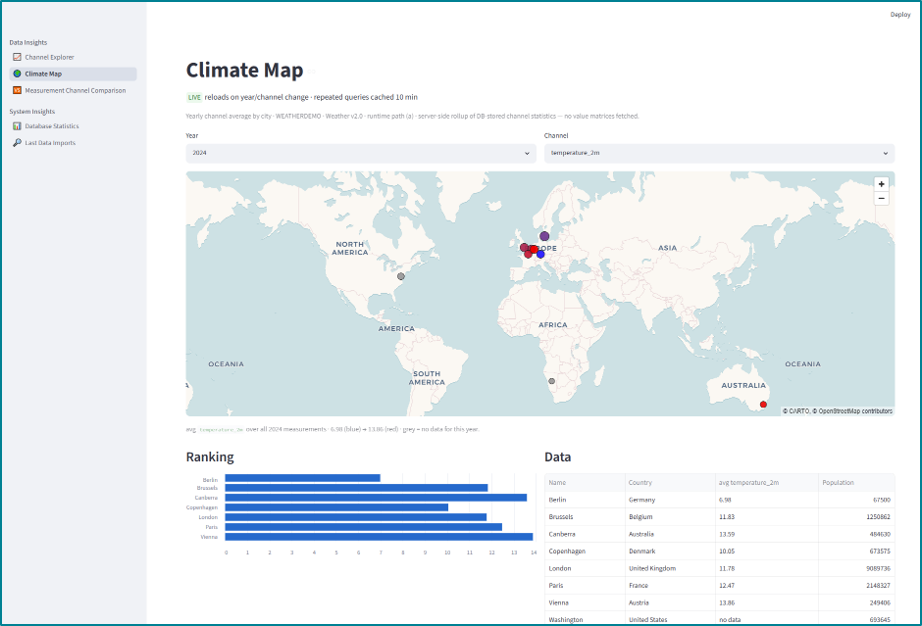
ASAM ODS Dashboards - Climate Map (Streamlit)
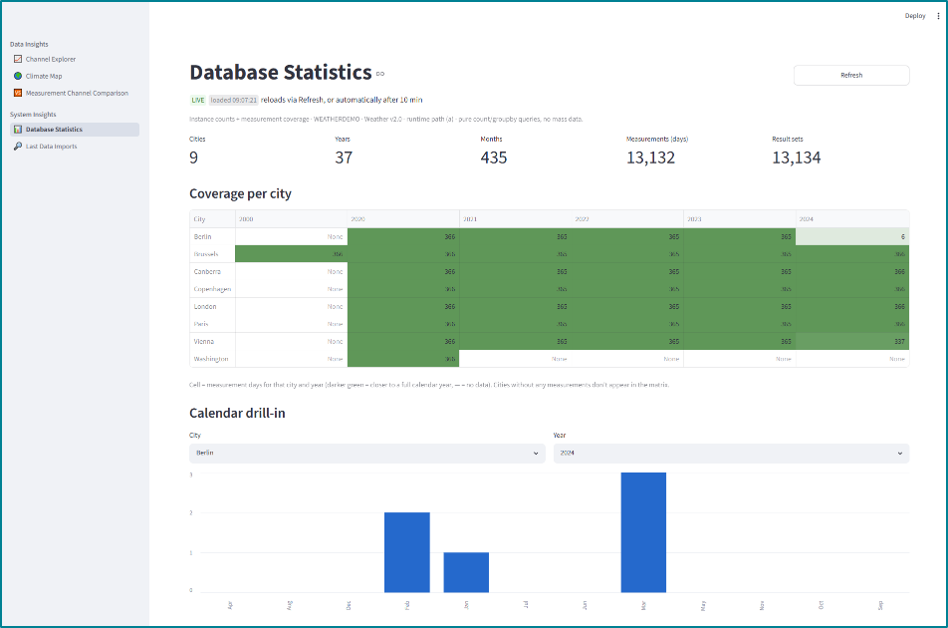
ASAM ODS Dashboards - Database Statistics (Streamlit)

ASAM ODS Dashboards - Last Data Imports (Streamlit)
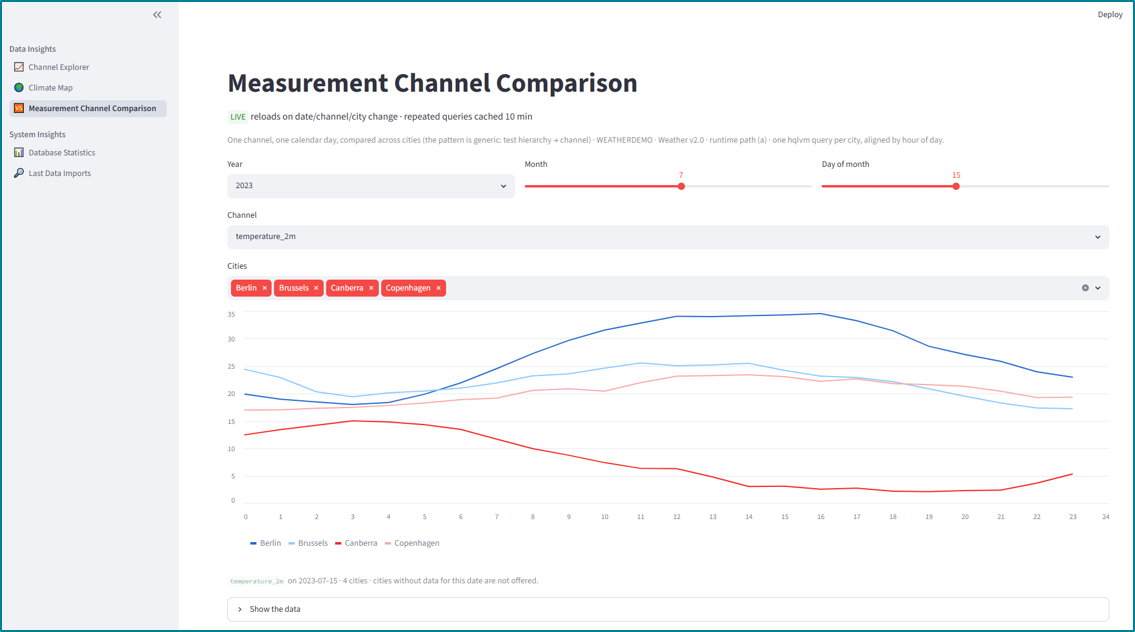
ASAM ODS Dashboards - Measurement Channel Comparison (Streamlit)
#ASAM #ODS #AI #MCP #HQL #Streamlit #TestData #HighQSoft
HighQSoft has published a new short story, When Data Spaces Come for Test Data, Standardization Connects. The piece argues that data spaces strengthen, rather than weaken, the case for ASAM ODS. A file-based stack works as long as the system stays local. The moment data crosses an organizational boundary, the standard is what makes that boundary tractable.
The article belongs to HighQSoft's standardization series, which dedicates one short story to each of the five test data management pillars. This installment is the Connected pillar, where the ASAM ODS Standard reaches across organizations into data spaces.
A data space connector solves transport, not meaning. A file dropped into a connector arrives at the consumer as a blob to be re-interpreted from filenames and folders. The Eclipse Dataspace Connector and its Tractus-X derivative move bytes between provider and consumer; they do not move the contents of those bytes. Without a shared schema, the consumer rebuilds the producer's interpretation by hand, every time, which is exactly the delegated re-import that standardized test data management was meant to avoid.
The story sets out five properties that decide whether a cross-organization exchange becomes useful infrastructure or stays a transport layer with a contract attached. These include schema-to-schema exchange, sub-file asset granularity, calculated results as practical assets, contracted reports and exports, and catalogs with lineage that make exchange auditable and reusable. The closest production parallel today is the Catena-X Product Carbon Footprint exchange, where values flow and aggregate across the supply chain only because a rulebook standardizes how each participant interprets each value.
The article shows two clean ways to connect a HighQSoft installation to a data space, both part of the production architecture today. Janus, the federation layer, treats a connector as one more handler and presents incoming assets as a unified ASAM ODS view for the consumer. ASAMCommander's internal NXServices, orchestrated by Merlin, publish measurements, KPIs, results, and reports to the data space as a provider. Both directions have been demonstrated with real connectors in the GAIA-X 4 KI and RepliCar research projects, including cross-cloud exchanges between separate clouds.
Read the full short story at When Data Spaces Come for Test Data, Standardization Connects.
*#ASAM #ODS #TestData #DataSpaces #GAIAX #DataSovereignty #HighQSoft*
The article then shows how HighQSoft's stack already plugs AI into the standard. The MCP Server connects Claude and ChatGPT to ASAM ODS through HQL. Merlin AI extends the same pattern to analysis pipeline composition. MoMa AI, from the AEOPT research project, generates importer mappings from sample data so a new measurement source becomes queryable in hours.
*#ASAM #ODS #AI #TestData #HQL #MCP #HighQSoft*
HighQSoft ASAMCommander now opens measurements directly in FAMOS through a one-click “Open with FAMOS” action. The integration took three hours of work on both sides and uses no proprietary plugins, vendor SDKs, or recompilation. The connection runs through pyHQL (ASAM ODS Toolbox for Python), HighQSoft’s Python library for the HQL query language.
FAMOS is a signal analysis and reporting environment used in automotive, aerospace, railway, and mechanical testing since 1987. Engineers rely on it for time-domain and frequency-domain post-processing, automated analysis sequences, and report generation.
HighQSoft ASAMCommander is a web-based test data management application that runs on AReS Libertas, a production-proven ASAM ODS 6 server. ASAMCommander enables engineers to search, filter, and govern measurements at enterprise scale.
An engineer searches and filters thousands of measurements in ASAMCommander Navigator, selects one, and sends it to FAMOS with a single click. Channels, units, sample rates, and metadata arrive together, so the analyst can move straight to curves and analysis sequences rather than deal with file exports.
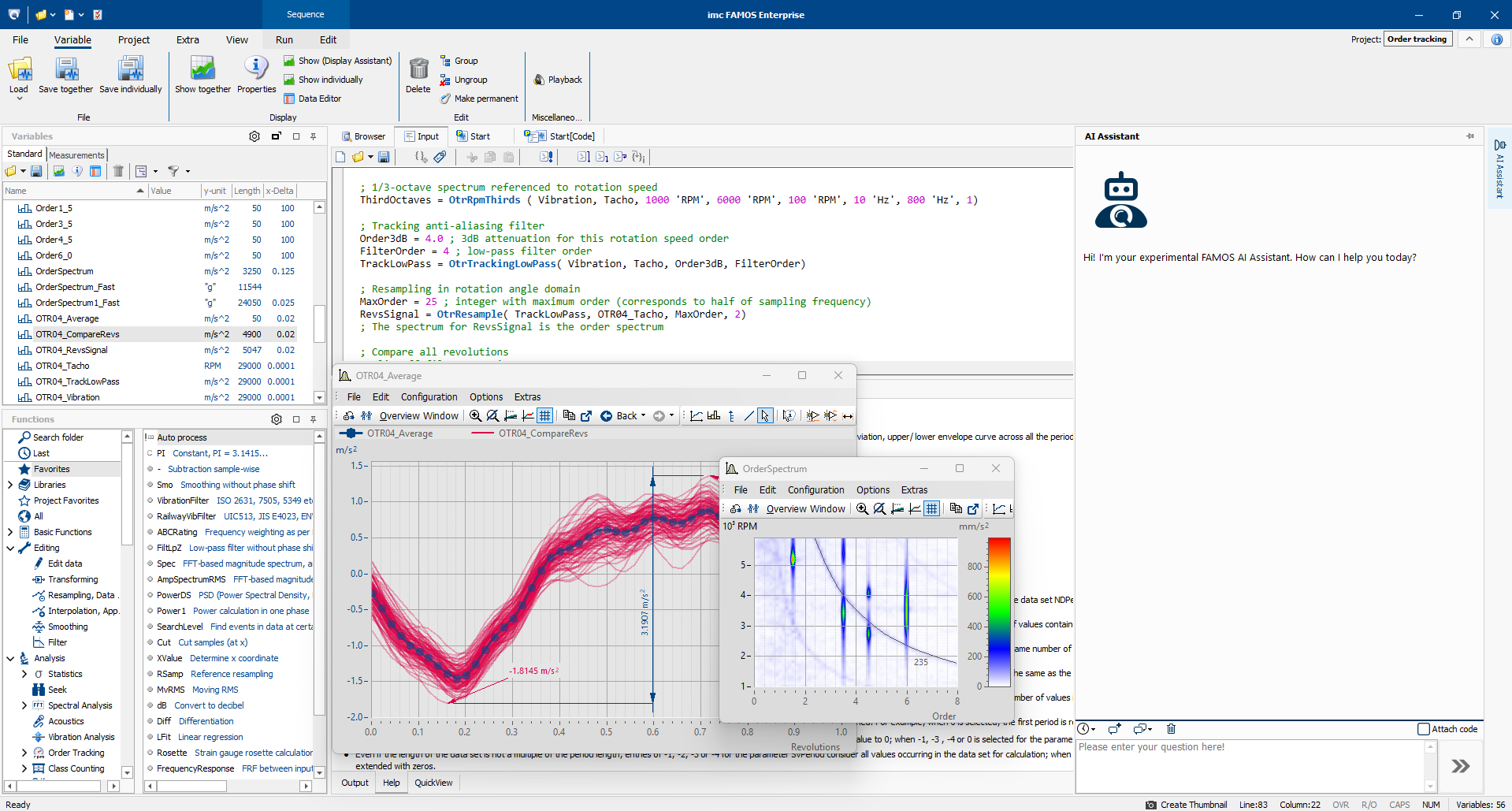
FAMOS: AI-powered analysis: quickly turn complex measurement data into clear answers
For test engineers
Find the right measurement
Use ASAMCommander to search and filter tens of thousands of measurements without leaving the browser.
Hand it off in one click
Open the selected measurement in FAMOS with channels, units, and metadata intact.
Keep your existing workflow
Run existing FAMOS analysis macros against ASAM ODS-managed data without learning a new interface or exporting files.
For ASAM ODS administrators
No file detours: Data stays in the ASAM ODS repository. Engineers analyze without exporting, so there are no local copies to govern, age, or recover.
Governed access: Users open data through the existing ODS authentication and permission model. Every read is the same, a controlled read, it would be from any ODS client.
Add tools through configuration: ASAMCommander’s modular Open-with mechanism supports new analysis targets without forking the application or shipping a server-side plugin.
FAMOS exposes a flexible Python API. HighQSoft offers pyHQL, a Python library that wraps the HQL query language for ASAM ODS. The kickoff turned into an implementation workshop. A ten-line pyHQL snippet inside a FAMOS sequence read measurements directly from AReS Libertas via ASAM ODS 6. In parallel, HighQSoft added "Open with FAMOS" as an integrated analysis target in ASAMCommander, built against requirements from imc. No fork, no plugin SDK, no proprietary protocol. Three hours of effort on each side.
The reason both halves stayed small is what sits underneath. ASAM ODS defines the data contract. HQL provides a simple, readable query layer on top of it. pyHQL keeps the calling code short. FAMOS provides a well-defined Python API. The four pieces line up.
The integration is ready to use. FAMOS, pyHQL, and ASAMCommander Pro are all available today; Contact imc Test & Measurement or HighQSoft for a live demonstration.
#imc #FAMOS #ASAMODS #TestDataManagement #pyHQL #HighQSoft #SignalAnalysis #Standardization
pyHQL (ASAM ODS Toolbox for Python) enables analysts and engineers to utilize the HighQSoft Query Language (HQL) to work directly with ASAM ODS data from Python, providing typed results, mass-data access with units, transactions, and file streaming for analysis, scripts, and dashboards.
HighQSoft is introducing pyHQL, a lightweight Python library that connects to the HQL WEB Service and, through it, to any ASAM ODS server in your infrastructure. You use familiar HQL commands to query metadata and measurement data. pyHQL maps ASAM ODS datatypes to convenient Python objects, allowing you to analyze them immediately.
pyHQL eliminates the effort of crafting low-level REST calls and interpreting ASAM ODS datatypes by providing a ready-to-use library—so teams can spend time analyzing data and focusing on insights rather than integration work.

Python Library for ASAM ODS: The HQL Web Service delivers product-based stability and all HQL comfort to the Python end-user.
For End-users
Query information easily — Use the same HQL queries you already know to retrieve any information from ASAM ODS servers - with all the comfort you'd expect!
Work natively in Python & Data Frames — Stay in your comfort zone with Python, Pandas, and friends.
For Analysts & Data Scientists
For Administrators
from highqsoft.pyHQL.HQL import HQL ASAM ODSURI="hql://admin:admin@localhost:xxxx?licenseserver=xxxx@licenseserver"
hqlURI="http://192.168.xxx.xx:xxx"
hql = HQL(hqlURI, ASAM ODSURI)
>>> result = hql.query("hql id, name from aotest")
>>> print(result)
---------------------------------------------------------
| Station 0.056 seconds to fetch 83 rows with 2 columns |
| id | name |
---------------------------------------------------------
| 26 | Alsfeld |
| 5 | Neuruppin-Alt Ruppin |
| 45 | Anklam |
...
| 81 | Veilsdorf |
| 82 | Oberhaching-Laufzorn |
| 83 | Waltrop-Abdinghof |
| 61 | Helmstedt-Emmerstedt |
---------------------------------------------------------
83 rows selected
---------------------------------------------------------
Query time: 0.056 seconds
Printer time: 0.001 seconds
Execution time: 0.057 seconds
pyHQL is available now as a ZIP for pip install from the HighQSoft download page. The manual includes installation steps, connection examples, and a quick tour of queries, mass data access, transactions, and file transfer.
#ASAM #ODS #TestData #Merlin #Python #pyHQL #TDM #TestDataManagement #ASAMODS #HighQSoft
ASAMCommander is a modular web application for ASAM ODS–based test data management systems, providing engineers, analysts, and administrators with a customizable platform. It offers flexible data exploration and visualization, convenient ODS client, Matlab and Python access, and server-side analysis automation.
With ASAMCommander 25.2, we are releasing a major update to the AC-Mainframe and platform foundation. The new version focuses on corporate identity, embedded applications, user and group integration, and more predictable deployments. Platform owners and administrators can now brand ASAMCommander to match their environment, integrate more tightly with existing corporate authentication systems, such as OAuth, and operate external modules in a controlled and configurable manner.
In many ASAM ODS environments, ASAMCommander is more than just a client – it is the central entry point into a larger measurement data ecosystem. If branding, user management, or deployment patterns do not align with corporate standards, adoption suffers and operational overhead increases. The 25.2 mainframe update strengthens ASAMCommander as a platform, enabling it to be branded like any other enterprise application and supporting external applications through a consistent deployment and configuration model. This gives platform teams more control while reducing friction for end users.
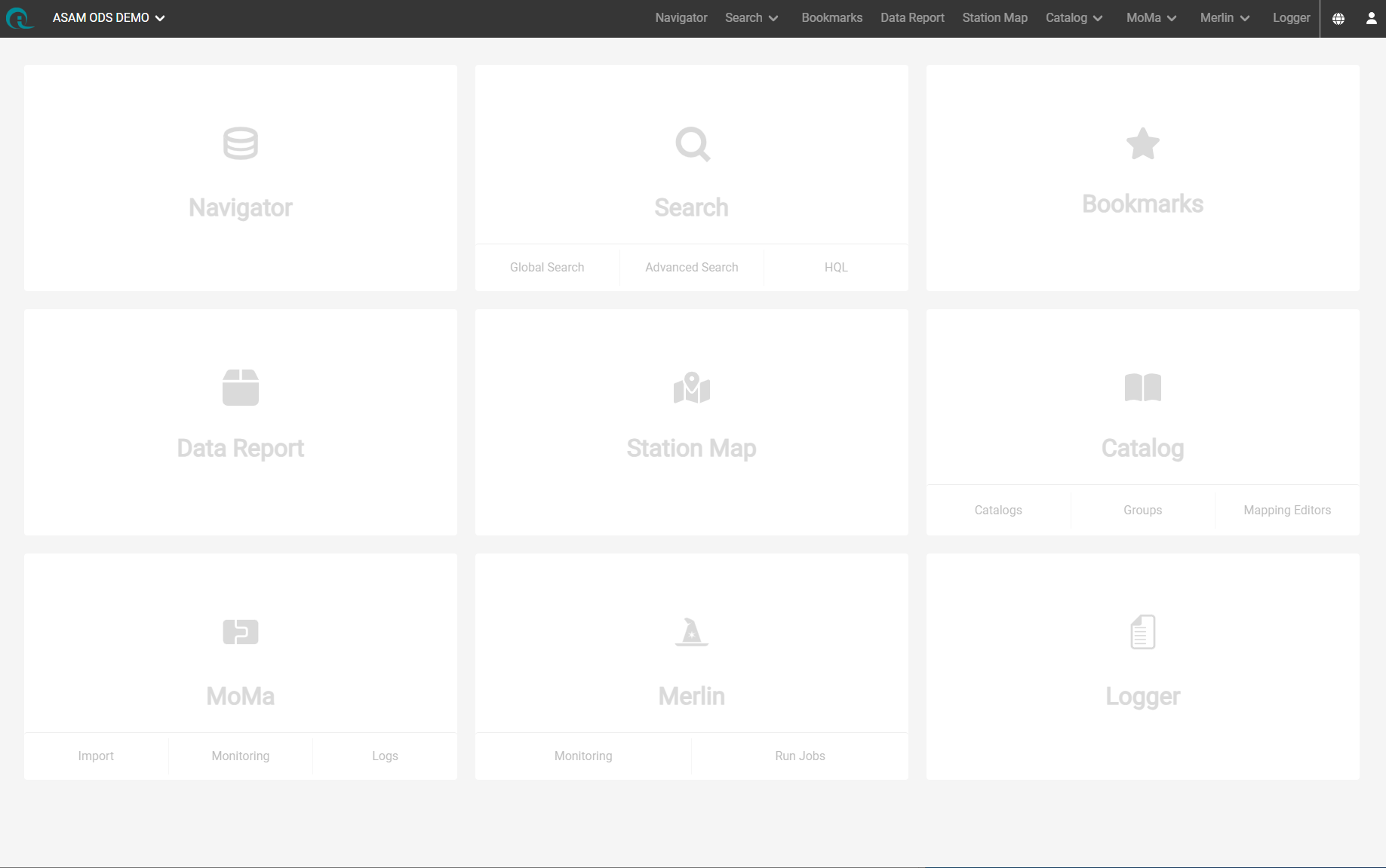
ASAMCommander including a selection of modules.
Mainframe - Corporate Identity and Embedded Applications
Catalogs Management - User & group integration
Deployment & external application integration
Logging and language polish
ASAMCommander 25.2 is available as an update for existing ASAMCommander installations. Customers can obtain the release via the usual delivery channels or on request. For installation support, upgrade planning, or questions about compatibility with your ASAM ODS environment, please contact your HighQSoft representative.
#ASAM #ODS #TestData #ASAMCOmmander #TDM #TestDataManagement #ASAMODS #HighQSoft
HighQSoft is introducing the Merlin UI, a new module for ASAMCommander that brings server-side analysis and job orchestration right into the end-user’s web application. Engineers can discover data, launch analyses, and monitor pipelines end-to-end—without leaving ASAMCommander.
As data volumes grow, manual, desktop-based analysis tools don’t scale. Merlin is a second-generation, technology-independent framework that standardizes execution so teams get faster, comparable, and reproducible results.
The following features are introduced:
For End-users
Start Job toolbar action available across multiple modules to launch analyses from within ASAMCommander.
Job bookmarks to quickly re‑run jobs or review prior results.
For business admins
Template Manager to control which job templates are available to end users.
Template Builder (Code & Graphical) to design and operationalize evaluations.
Job Monitoring & Logging for live status, history, and traceability.
Data Lineage to trace software, processes, and all interactions with your datasets.

Automation of Processing jobs with Merlin - UI for the Blueprints Manager
ASAMCommander is a modular ASAM ODS web application for data exploration and management. Out of the box, ASAMCommander already integrates expert tools like AVL Concerto, MATLAB, and NI DIAdem, and supports exporting ATFx, CSV, and MDF4—so you can keep preferred workflows in one place.
Merlin extends this with:
Technology-independent executors (Python, Java, MATLAB, Spark)
Resource management, queuing/scheduling, and event triggers (e.g., on import)
Standardized, comparable results with full data lineage
Template types supported include importing, data validation, processing/analysis, statistics generation, archiving, and maintenance tasks.
Merlin is a second-generation, technology-independent framework for server-side analyses that orchestrates jobs, schedules execution, and scales across runtimes. It brings the algorithm to the data and ensures reproducible results with data lineage. Merlin integrates seamlessly with ASAM ODS-based test data management.
#ASAM #ODS #TestData #Merlin #DataLineage #TDM #TestDataManagement #ASAMODS #HighQSoft
23 participants from 9 companies in 4 countries meet to test ASAM ODS client applications, ASAM ODS servers, and ATFX files for compliance with the ASAM ODS standard.
As in previous cross-tests, the participating companies came together to test and improve their software in real-life scenarios. The participants helped each other to understand the small differences in the data formats of the various programs and to solve the difficulties that can arise when interpreting this data. They were also able to discuss ambiguities and contradictions in the standard documentation, which can then be eliminated in the next version of the standard.
Once all the servers in the network had been set up, the first client connections were established. At the end of the first day, all clients were able to connect to all servers.
Each participating client was assigned an Excel sheet with the scenarios to be tested for each server. This time, the participants agreed to test only the http interface of the ODS standard. The scenarios were, for example:
The tests were then carried out on the second day. Groups were formed with at least one representative each from the client manufacturer and the server manufacturer. A few identified problems were posted directly as issues in the ASAM GitHub of the ASAM ODS working group to be resolved with the upcoming release.
Today, we released a number of improvements for our products
The release includes several enhancements for managing catalogs in ASAM ODS (Physical Dimensions, Units, Quantities, and groups). The Catalog Editor provides comprehensive CRUD (Create, Read, Update, Delete) operations and additional features like transaction control, drag and drop functionality, and support for managing catalog elements and their instances.
This update allows creating transactions outside of HQL and requesting HQL to use them. This lifts the limitation of only one transaction per ASAM ODS session.
A new Validation Job Pipeline runs custom Python scripts on imported data if certain criteria are met. The scripts can generate new parameters or measurements based on the data.
Introduces a Job Pipeline for checking newly imported measurements against filter criteria stored in the ASAM ODS database. The pipeline stages include applying filter criteria, copying processing results, and triggering validation.
Implements a git storage for loading remote stage functions for Job Pipelines making it easier to manage and update scripts.
All updates enhance the functionality and flexibility of the Test Data Management Ecosystem providing robust tools for data validation, transaction handling, and catalog management.
#HighQSoft #Release #HQL #SoftwareUpdate #ASAMCommander #ASAMODS
HighQSoft GmbH
Black-und-Decker-Straße 17b
D-65510 Idstein
You are currently viewing a placeholder content from Facebook. To access the actual content, click the button below. Please note that doing so will share data with third-party providers.
More InformationYou are currently viewing a placeholder content from Instagram. To access the actual content, click the button below. Please note that doing so will share data with third-party providers.
More InformationYou need to load content from hCaptcha to submit the form. Please note that doing so will share data with third-party providers.
More InformationYou need to load content from reCAPTCHA to submit the form. Please note that doing so will share data with third-party providers.
More InformationYou are currently viewing a placeholder content from Turnstile. To access the actual content, click the button below. Please note that doing so will share data with third-party providers.
More InformationYou are currently viewing a placeholder content from X. To access the actual content, click the button below. Please note that doing so will share data with third-party providers.
More Information


